
Description
ChatNet is a modern, self-hosted Discord-style chat platform that you can run entirely on your own server. Create Rooms, Channels, Voice Chats, Private Messages, and a rich messaging experience — all powered by PHP and MySQL, with no Node.js or complex servers required.
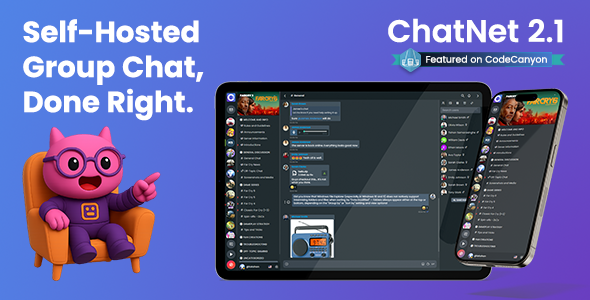
Install in minutes, customize everything with full source code access, and enjoy a one-time purchase with lifetime updates.
Why Choose ChatNet?
- ✅ Self-hosted with complete data ownership
- ✅ Discord-like Rooms, Channels & Voice Chat
- ✅ Powered by PHP & MySQL — works on shared hosting
- ✅ No Node.js or complex server stacks required
- ✅ Full source code included for total customization
- ✅ One-time payment — no subscriptions, no limits
- ✅ Modern UI with mobile PWA support
Perfect For
- ✅ Gaming communities and clans
- ✅ Educational platforms and virtual classrooms
- ✅ Business teams and internal communication
- ✅ Support systems and customer communities
- ✅ Niche hobby or interest-based groups
- ✅ Developers building custom chat ecosystems
- ✅ Privacy-focused or GDPR-compliant projects
Follow us on Twitter: @oncodestech
Share Your Ideas: Help shape ChatNet’s future at https://chat-net.canny.io/
Online Live Demo
Documentation
System Requirements
✨ Discord-Like Modern Interface (NEW in v2.0)
ChatNet v2.0 introduces a complete architectural transformation with a Discord-inspired layout:
- Unlimited Rooms – Create separate communities (like Discord servers) for different topics or groups
- Organized Channels – Each room contains multiple channels organized in collapsible categories
- Three Channel Types:
- Text Channels – Standard group chat with all messaging features
- Announcement Channels – Read-only channels for important updates (admins/mods only post)
- Voice Channels – Multi-user audio communication rooms
- Channel Categories – Organize channels into logical groups (e.g., “General”, “Gaming”, “Support”)
- Modern Sidebar Navigation – Quick access to rooms, channels, and direct messages
- Collapsible UI Elements – Show/hide sidebars for focused chatting experience
☝ Voice & Video Communication
Take conversations beyond text with crystal-clear voice and video communication:
- Voice Channels – Create drop-in audio rooms where users can chat hands-free while browsing or multitasking
- 1-on-1 Video Calls – Enable face-to-face conversations for personal support, interviews, or meetings
- Professional Quality – Powered by Agora RTC for reliable, high-quality audio and video
- Complete Call Controls – Mute audio, disable video, switch cameras with easy-to-use controls
- Voice Activity Indicators – See who’s talking in real-time with visual indicators
- Call History Tracking – Keep records of incoming, outgoing, and missed calls
✍ Advanced Messaging System
Support for 10 different message types with rich formatting:
- Text Messages – Markdown formatting (bold, italic, strikethrough, code blocks, quotes)
- Images – Drag-and-drop upload with automatic optimization and gallery view
- GIFs – Integrated GIF library with search (powered by Tenor)
- Stickers – Custom sticker packs (upload your own)
- Files – Share PDFs, documents, archives (DOC, XLS, ZIP, etc.)
- Audio Messages – Voice recording with playback controls
- Link Previews – Automatic rich previews with thumbnails
- Code Snippets – Syntax-highlighted code blocks with copy button
- Message Editing – Edit sent messages (shows “edited” label)
- Message Forwarding – Share messages to other channels/users
✨ Emojis, Stickers & GIFs – Express Yourself
Native Emoji System (NEW in v2.0) – Complete emoji overhaul with modern Unicode support:
- 2000+ Native Unicode Emojis – Cross-platform emoji support with device-native rendering
- Modern Emoji Picker – Beautiful emoji selector with categories and search
- Custom Server Emojis – Upload custom emojis for your rooms (64×64px)
- Emoji Reactions – React to messages with any emoji (Facebook-style)
- Emoji Autocomplete – Type : to trigger emoji picker while typing
Custom Sticker Packs – Add personality with custom stickers:
- Create Custom Sticker Packs – Upload your own sticker collections for unique expressions
- Easy Management – Add, organize, and manage sticker packs from admin dashboard
- Unlimited Creativity – Brand your community with custom stickers
- User Engagement – Stickers make conversations more fun and interactive
Integrated GIF Library – Search and share animated GIFs instantly:
- Powered by Tenor – Access thousands of trending and searchable GIFs
- Instant Search – Find the perfect GIF with keyword search
- Trending GIFs – Panel automatically shows popular GIFs
- One-Click Sharing – Send GIFs directly in conversations with a single click
✍ Global Private Messaging (NEW in v2.0)
Connect with users privately from anywhere in the platform with our advanced Private Chat Script features:
- Direct Messages (DMs) – Start private 1-on-1 conversations without joining specific rooms
- Always Accessible – Access your DMs from the global sidebar, no matter which room you’re in
- Full Feature Support – Send images, files, GIFs, stickers, voice messages, and make video calls
- Read Receipts – Know exactly when your messages are delivered and read
- Typing Indicators – See when the other person is composing a reply
- Privacy Controls – Block unwanted users, mute noisy conversations, and favorite important contacts
- Unread Badges – Never miss important messages with unread notification counts
✨ Advanced Chat Features
Powerful tools to enhance communication and organization:
- @Mentions – Get someone’s attention by tagging them, or use @everyone for important announcements
- #Hashtags – Create searchable topics and organize discussions around specific subjects
- Pinned Messages – Keep important announcements, rules, or resources at the top of channels
- Advanced Search – Find any message instantly with filters for users, dates, message types, and channels
- Infinite Scroll – Browse years of conversation history with smooth, seamless loading
- Media Gallery – Quick access to all recently shared photos, files, and links in one organized view
- Message Reactions – Express yourself quickly with emoji reactions (Facebook-style)
- Radio Stations / Audio Player – Keep your community engaged with integrated radio stations or playlists that users can listen to while chatting, adding an ambient entertainment layer to conversations
⚡ Powerful Room & Channel Management
✨ Room Features
- Unlimited Rooms – Create as many communities as you need
- Room Privacy Levels:
- Public – Anyone can find and join, visible in explore section
- Private – Invitation-only, hidden from public directory
- Password Protected – Public but requires password to enter
- Room Customization:
- Custom room icons and cover images
- Room categories for organization
- Welcome messages and rules
- Custom background images for chat areas
- Advertisement Spaces – Room-specific ad slots (top/bottom) support HTML or image ads for monetization
- Explore Section – Browse and join public rooms without invitation
- Room Statistics – Track members, messages, and activity
➕ Monetization Features
Generate revenue from your chat platform:
- Advertisement Spaces – Display ads in room-specific slots (top and bottom positions)
- HTML & Image Ads – Support for custom HTML code or image-based advertisements
- Flexible Placement – Control which rooms display ads and customize ad content per room
✍ Channel Management
- Channel Categories – Organize channels into collapsible groups
- Channel Permissions – Granular control over who can:
- Send messages and upload files
- Pin messages and manage channels
- Private Channels – Restrict visibility to selected users only
- Slow Mode – Rate limit messages to prevent spam
- Channel Order – Channel reordering (NEW in v2.1)
✍ Complete User Management System
✋ User Roles & Permissions
- Four User Roles:
- Admin – Full system access and dashboard control
- Moderator – Content moderation and user management
- Member – Standard registered users
- Guest – Temporary access with configurable limitations
- Room-Specific Moderators – Assign moderators to specific rooms
✨ User Features
- User Profiles – Avatars, cover images, bios, and personal details
- User Status – Available, Busy, Away, Offline indicators
- Online/Offline Tracking – Real-time presence system
- Block Users – Prevent unwanted communication
- Multi-Language Support – Each user can select their preferred language
⛔ Moderation Tools
- Kick/Ban Users – Remove disruptive users temporarily or permanently
- Report System – Users can flag inappropriate content
- IP Logging – Track login attempts and user activity
- Profanity Filter – Block or replace inappropriate words
- Flood Control – Prevent message spam with rate limiting
- Domain Filter – Block specific URLs from being shared
⚓ Powerful Integrations
⛅ Cloud Storage
- AWS S3 – Unlimited scalable file storage
- MinIO – Self-hosted S3-compatible storage
- Benefits:
- Unlimited scalability
- Automatic image resizing and optimization
- CDN integration for global delivery
- Reduced server storage requirements
⚓ Social Login (40+ Providers)
- Facebook OAuth
- Google OAuth
- Twitter OAuth
- LinkedIn OAuth
- GitHub OAuth
- 35+ More via HybridAuth library
❗ Push Notifications
- Firebase Cloud Messaging – Real-time browser push notifications
- Email Notifications – SMTP support for Gmail, SendGrid, Mailgun, etc.
- Configurable Triggers – Choose when to send notifications (mentions, DMs, all messages)
☝ Video Calling
- Agora RTC Integration – Professional video calling service
⚓ WordPress & Website Integration
⚓ Seamless WordPress Integration
Connect ChatNet with your WordPress website effortlessly for a unified user experience:
- Single Sign-On (SSO) – Users log in through WordPress without separate ChatNet authentication
- Unified User Management – WordPress users automatically sync with ChatNet
- Easy Setup – Integration introduced in v1.7, documentation included
- Seamless Experience – No duplicate registrations or logins required
- Role Mapping – WordPress user roles can be mapped to ChatNet roles
⚓ Integrate with Any Website or Application
Not using WordPress? No problem! ChatNet provides flexible API integration:
- Single Sign-On Support – Implement SSO from your existing user system
- Custom Integration Examples – Documentation includes API integration guides
✨ Use Cases for Integration:
- Learning Management Systems – Add chat to educational platforms
- E-Commerce Sites – Customer support and community building
- Content Websites – Engage readers with live discussions
- Gaming Platforms – In-game community chat integration
- Business Portals – Internal team communication
✨ Unlimited Customization
✨ Visual Customization (No Coding Required)
- Theme Modes:
- Light Theme
- Dark Theme (default)
- Layout Options:
- Show/hide sidebars
- Full-width responsive layout
- Branding:
- Custom logo (light and dark versions)
- Favicon
- Site name and tagline
- Remove all “ChatNet” branding (white-label)
- Custom Pages & Menus:
- Create unlimited custom pages (Rules, FAQ, Resources, Help, Guidelines, etc.)
- Build custom navigation menus for easy site navigation
- Rich text editor for easy content management
- No coding required – manage everything from admin dashboard
- Perfect for documentation, policies, help centers, and more
✍ Multi-Language Support
- Built-in Translation Manager – Translate all text from admin panel
- RTL Support – Full support for Arabic, Hebrew, and other RTL languages
- Language-Specific Google Fonts – Optimal typography for each language
- Per-User Language Selection – Each user chooses their preferred language
✍ Developer-Friendly
- Well-Commented Code – Easy to understand and modify
- Custom CSS Editor – Add your own styles without editing core files
- Plugin System – Extend functionality with custom plugins
- Comprehensive Documentation – Detailed guides for customization
✍ Comprehensive Admin Dashboard
Manage your entire chat platform from a modern, Bootstrap 5-based admin dashboard with 40+ configuration pages:
- Dashboard Home – Statistics, recent activity, quick actions
- General Settings – Site configuration, registration, feature toggles
- Room Management – Create/edit rooms, categories, permissions
- Channel Management – Manage channels, categories, ordering (NEW in v2.1)
- User Management – User list, roles, bulk operations
- Content Moderation – Review flagged content, delete messages
- Appearance – Theme customization, colors, layouts
- Translation Manager – Add/edit languages and translations
- Email Settings – SMTP configuration, templates
- Cloud Storage – S3/MinIO configuration
- Social Login – OAuth provider setup
- Video Calling – Agora integration
- Push Notifications – Firebase push notification setup
- Security – IP filtering, 2FA, flood control, profanity filter
- Plugins – Plugin management and configuration
✅ Perfect For
⚽ Gaming Communities
Create Discord-like servers for clans, guilds, and gaming groups with voice channels, organized game-specific channels, and real-time Group Chat Room features.
✍ Educational Platforms
Host virtual classrooms with announcement channels for lectures, text channels for discussions, and private messaging for student support.
✋ Business Teams
Organize departments with private rooms, secure communication, and complete data ownership for sensitive business discussions.
⚓ Social Networks
Build niche communities around interests, hobbies, or topics with organized channels, media sharing, and user profiles.
✍ Developer Communities
Share code snippets with syntax highlighting, create project-specific channels, and collaborate with file sharing.
⛔ Privacy-Focused Projects
Maintain complete control over your data with self-hosted infrastructure, perfect for GDPR compliance and sensitive communications.
⛔ Security & Compliance
- Secure Password Hashing – bcrypt algorithm for password storage
- CSRF Protection – All forms protected against cross-site request forgery
- Rate Limiting – Prevent API abuse and spam
- IP Logging – Track access and login attempts
- IP Whitelist/Blacklist – Control who can access your platform
- HTTPS/SSL Support – Secure encrypted connections
- GDPR Compliant:
- Cookie consent popup
- Privacy policy page
- Terms and conditions page
- Data Retention Policies – Automatically delete old messages and files
- reCAPTCHA Support – Prevent bot registrations
⚡ Performance Optimized
- Automatic Image Optimization – Resize and compress uploaded images
- Lazy Loading – Load images only when visible
- Efficient Pagination – Infinite scroll with smart loading
- Cache Management – Template and query caching
- CDN Ready – Integrate with any CDN for global delivery
✅ What’s Included
- Full ChatNet source code
- Comprehensive HTML documentation
- Database schema and migration scripts
- Installation wizard
- Sample sticker packs
- Default avatars and images
- .htaccess and nginx config examples
- 6 months of support
- Free lifetime updates
❓ Professional Support
Our dedicated support team is here to help you succeed with ChatNet:
- Support – Help Center
- Documentation Center – support.oncodes.com
- Feature Requests – chat-net.canny.io
- Updates on Twitter – @oncodestech
6 months of free support included with your purchase, extended support available.
❓ Frequently Asked Questions
❓ Can I install ChatNet on shared hosting?
Yes. ChatNet runs on most shared hosting providers (GoDaddy, Bluehost, HostGator, Namecheap, etc.) as long as your server supports PHP 8.1+ and MySQL/MariaDB. No Node.js is required.
❓ How easy is the installation?
Very easy. Upload the files, open the installer in your browser, enter your database details, and finish setup in 5–15 minutes. No advanced skills needed.
❓ Do you provide installation help?
Yes. If you need assistance, you can open a ticket at our Help Center and our team will guide you through the setup.
❓ Is this a one-time payment or subscription?
ChatNet is a one-time purchase. You get:
- ✅ Full source code
- ✅ Unlimited users & rooms
- ✅ Free lifetime updates
- ✅ 6 months of support
- ✅ No recurring or per-user fees
❓ Can I integrate ChatNet with WordPress?
Yes. ChatNet supports WordPress Single Sign-On (SSO), so your WordPress users can log in without creating a separate account.
❓ Can I integrate ChatNet with my own website or app?
Absolutely. ChatNet includes API endpoints and supports custom Single Sign-On (SSO) for external systems.
❓ How do voice and video calls work?
ChatNet uses Agora RTC for high-quality voice and video. Just add your Agora App ID & Certificate in the admin panel. The free tier is enough for most projects.
❓ Do I fully own my data?
Yes — 100%. ChatNet is self-hosted, so all messages, files, and user data stay on your server. No third-party access, no tracking, fully GDPR-friendly.
❓ Can I customize the design?
Yes. You can customize:
- ✅ Light & Dark themes
- ✅ Colors & branding
- ✅ Logos & layout
- ✅ Custom CSS
- ✅ Full source code for deep changes
❓ Will updates delete my data?
No. ChatNet includes a built-in updater that preserves all your data, settings, and customizations. You also receive lifetime free updates.
❓ Regular vs Extended License?
Regular License: Use on one project where users are not charged for access.
Extended License: Required if users pay to access the chat or if you build a paid SaaS platform.
❓ Can I use ChatNet for client projects?
Yes. You can use ChatNet in commercial projects, but each installation/domain requires its own license. White-labeling and rebranding are allowed.